Does myQ Work With Apple HomeKit?
myQ does not directly work with Apple HomeKit. For Siri or Apple Home control, choose a compatible third-party garage controller and check that it supports your opener.
On this page (6 sections)
myQ does not directly work with Apple HomeKit. For Siri or Apple Home control, choose a separate garage controller that supports HomeKit and confirm it works with your opener model.
The myQ app can provide remote control and monitoring, but a myQ hub alone does not add HomeKit support. If your goal is control from Apple's Home app, shop for HomeKit compatibility first, then check the opener requirements.
Does myQ work with Apple HomeKit directly?
No, myQ does not directly integrate with Apple HomeKit. A myQ Smart Garage Control hub connects a compatible opener to the myQ app, while HomeKit support depends on the controller you choose.
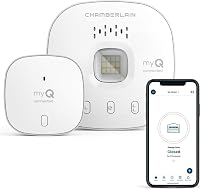
The Chamberlain Smart Garage Control hub is designed for myQ app control. Its stated setup needs include 2.4 GHz Wi-Fi, a sectional garage door, and a compatible opener; it is not described as a HomeKit device.
Before choosing a hub, compare your opener's features in our Wi-Fi garage door opener guide. For the broader myQ overview, read what myQ does in a garage.
How can you control a garage door with HomeKit?
Use a garage controller that explicitly supports Apple HomeKit. HomeKit compatibility can provide Apple Home app or Siri control, but the controller still needs to match your opener and setup.
The meross MSG150HK is a HomeKit-compatible option for many Chamberlain, LiftMaster, and Craftsman openers using Security+ 1.0 or 2.0. It does not support Security+ 3.0 or other opener brands, so check the exact model and learn-button type before buying.
The meross model uses 2.4 GHz Wi-Fi. Its maker also says that remote access through Apple's Home app uses an existing Apple device as a home hub.
Does a HomeKit garage opener need an Apple home hub?
Remote Home app access may need an Apple device acting as a home hub. Check the specific controller's setup instructions to see what is needed for access when you're away.
The meross MSG150HK supports HomeKit, while the meross model with external antenna also supports HomeKit and says remote access through Apple's Home app uses an existing Apple device as a hub. Their app-based control and HomeKit remote access are separate setup paths.
This meross controller supports many opener brands and models, but compatibility still depends on the exact opener. For Chamberlain, LiftMaster, or Craftsman units, it may need an extra adapter.
What should you check before buying a HomeKit controller?
Confirm the opener model, protocol, sensor setup, Wi-Fi band, and hub needs. Compatibility varies by controller, even when two devices both support HomeKit.
The MSG150HK is limited to many Chamberlain, LiftMaster, and Craftsman openers on Security+ 1.0 or 2.0. The external-antenna meross controller supports a wider stated range of brands and models, but it still excludes Security+ 3.0 and may require an adapter for some openers.
The myQ Smart Garage Control hub has different requirements: it works with many brands made after 1993 that use compatible photoelectric sensors, but excludes certain Chamberlain Group models with yellow learn buttons and Linear openers. It also requires a sectional door and a nearby 2.4 GHz Wi-Fi router.
If you are replacing the entire opener instead of adding a controller, compare drive type and mounting choices in our garage door opener buying guide. Our overview of garage opener types can help you decide which setup suits your garage.
Can you add HomeKit to a myQ opener?
You may be able to add HomeKit through a compatible third-party controller, but myQ itself does not provide the direct link. Check both the controller's compatibility and any adapter or Apple hub requirements.
A separate HomeKit controller can coexist with an opener that also uses myQ, depending on the opener and wiring setup. Do not assume that a myQ app connection makes an opener HomeKit-compatible, or that every HomeKit controller supports every myQ opener.
The Chamberlain 1/2 HP belt drive myQ opener includes myQ app control and battery backup. Its myQ feature alone does not guarantee HomeKit support, so verify compatibility before choosing it for an Apple Home setup.
For opener selection based on garage size and daily use, see our garage door opener buying guide.
What is the practical difference between myQ and HomeKit?
myQ is Chamberlain's garage control system, while HomeKit is Apple's smart home platform. A product must support both systems, or work through a compatible bridge, for it to appear in Apple's Home app.
The myQ app can be enough if you only need phone access, alerts, or scheduling through myQ. HomeKit support matters when you want Apple's Home app or Siri as part of your control setup.
Do not choose a device based only on a general label such as “smart” or “Wi-Fi.” Look for explicit Apple HomeKit support and an opener compatibility list that includes your model.
Which option should you choose for Apple Home?
If HomeKit and Siri are the priority, select a controller that explicitly supports Apple HomeKit and confirm your opener is on its compatibility list. The meross MSG150HK is the narrower match for many Chamberlain, LiftMaster, and Craftsman Security+ 1.0 or 2.0 openers.
If your opener falls outside those brands or protocols, compare the external-antenna meross model and check for any adapter requirement. Choose the myQ Smart Garage Control hub if myQ app control is what you need, and treat HomeKit support as a separate requirement.
For related smart garage questions, read whether myQ works with Google Home and whether Genie Aladdin Connect works with Alexa.
Frequently asked questions
Does myQ work with Apple HomeKit?
myQ does not directly integrate with Apple HomeKit. If you want garage door control in Apple's Home app or through Siri, look for a separate controller that specifically supports HomeKit and verify that it works with your opener model.
Can I use Siri to control a myQ garage door?
The myQ app and a HomeKit compatible controller are separate systems. A compatible third-party controller may provide Siri control, but check its supported opener models and setup needs before buying.
Voice commands should never replace checking that the door is clear and operating safely.
Does the myQ Smart Garage Control hub support HomeKit?
The Chamberlain myQ Smart Garage Control hub connects a compatible opener to the myQ app, but it is not described as a HomeKit device. Choose a controller that explicitly supports Apple HomeKit if using Apple's Home app or Siri is essential.
What should I check before buying a HomeKit garage controller?
Check the exact opener model, learn button or control protocol, sensor arrangement, Wi-Fi needs, and whether remote access requires an Apple home hub. Some controllers support only certain brands or protocols, so confirm compatibility before ordering.